
Signing Methods
In this guide, we discuss the types of signing methods, it's uses, how to configure them, and how to use them in API calls.
Signing methods are integral to securing user wallets and facilitating various application actions. Currently, three signing methods are available: PIN, Emergency Code, and Biometric.
PIN: Users can set up a 6-digit PIN to access their wallet. Each user can have only one PIN signing method, which can be used to authenticate requests.
Emergency Code: An emergency code, 25 characters long with a minimum of 128 bits of entropy, serves as a backup recovery method for users. If the
valueparameter is omitted during creation, the API generates the code automatically.Biometric: This signing method allows users to utilize biometric features such as Face ID or Touch ID for authentication. During setup, the
valueparameter specifies the biometric feature, while thephysicalDeviceIdrepresents the unique ID of the user's device.
Signing methods ensure the security, accessibility, and convenience of user authentication within applications. Whether users opt for a traditional PIN, rely on an emergency code for backup, or embrace cutting-edge biometric authentication. Signing methods empower users to access and manage their digital assets securely.
What do Signing Methods do?
They serve as the gateway for users to perform various actions, including:
Accessing Wallets: Signing methods authenticate users and grant them access to their wallets, ensuring that only authorized individuals can view or interact with their digital assets.
Recovering PINs: If users forget their PINs or encounter authentication issues, signing methods such as emergency codes provide a backup recovery mechanism, allowing users to regain access to their wallets. Each signing method can recover any other signing method. Therefore, having at least two signing methods per user is always recommended.
Signing Signature Requests: Users can utilize signing methods to sign signature requests, validating the authenticity of transactions or interactions within the application.
Executing Transactions: Signing methods enable users to securely execute transactions, including token transfers or NFT transactions, by verifying their identity and authorizing the requested actions.
Types of Signing Methods
There are currently three types of signing methods available: PIN, Emergency Code, and Biometric.
PIN
The PIN signing method is the most common. It provides a reliable, secure, and user-friendly mechanism for authenticating users and granting them access to their wallets within applications.
Users are encouraged to choose unique and secure PINs, avoiding easily guessable combinations and maintaining the confidentiality of their PINs.
The user will be able to use other signing methods to recover their PIN, or the other way around—each of the signing methods can be updated with another valid signing method.
The PIN signing method should contain six digits. A user can have only one PIN signing method.
Once it’s set up, it can be used by providing the PIN in the header of the API request, with the Signing-Method parameter as id:value
📘The
idparameter is referring to the id of the signing method, not the id of the user.
Emergency Code
The emergency code signing method serves as a crucial backup mechanism for users to regain access to their wallets in case they encounter authentication issues or forget their PINs. By providing an alternative means of authentication, applications can ensure that users can manage their digital assets with confidence and peace of mind,
The EMERGENCY_CODE signing method should be 25 characters long and have at least 128 bits of entropy. A user can have only one emergency code.
When creating it, you can specify the value (25 characters), or you can leave it out of the request body. If you don’t specify it, we will generate a code with the required entropy and you’ll receive it in the response.
When creating the emergency code, you can specify it as follows or just specify the type to autogenerate an emergency code.
JSON
📘Emergency code should be 25 characters long. If you remove the
valueparameter, the API will auto generate the code for you.
Once it’s set up, it can be used by providing the Emergency Code in the header of the API request, with the Signing-Method parameter as id:value
Biometric
The biometric signing method leverages unique physical characteristics, such as fingerprint scanning (Touch ID) or facial recognition (Face ID), for application user authentication and wallet access. It represents a cutting-edge approach to user authentication, offering a balance of convenience and security for accessing wallets within applications.
By leveraging advanced biometric technology, applications can provide users with a frictionless and secure authentication experience, enhancing overall user satisfaction and trust.
When creating the BIOMETRIC signing method, it should contain:
The
valueof the biometrics you want to set up (for example, Face ID or Touch ID)The
physicalDeviceIdwhich is the unique ID of the user's device
When creating the biometric signing method, you can specify it as:
JSON
Once it’s set up, it can be used by providing the Biometric data in the header of the API request, with the Signing-Method parameter as id:value
🚧Quantum does not retain any signing method data, including PINs, recovery codes, or biometric information. This ensures that attackers cannot access any digital assets stored in wallets, even during a security breach. Quantum functions as a non-custodial wallet service, allowing customers to implement our service in either a non-custodial or custodial manner.
Example
The signing methods are a way of authenticating, therefore the Signing method, similar to the Bearer token, is passed in the Header of the API call with the Signing method id and the value of the specific signing method.
Passing the Signing-Method parameter through the header with value: id:value
Generic Example:
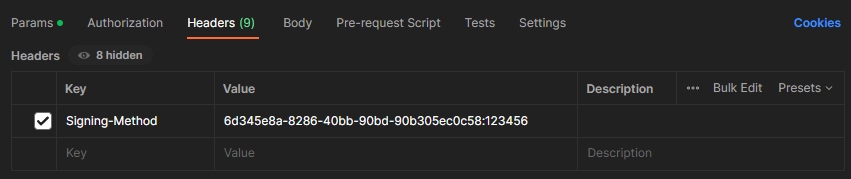
In this example, a PIN signing method ID (6d345e8a-8286-40bb-90bd-90b305ec0c58), separated by a colon is used with it's value (123456)
id: This is the ID of the signing methodvalue: This is the value of the signing method
HTTPS
Postman:
In Postman, you can add the Signing-Method in the header with it's value.
In our API-Reference
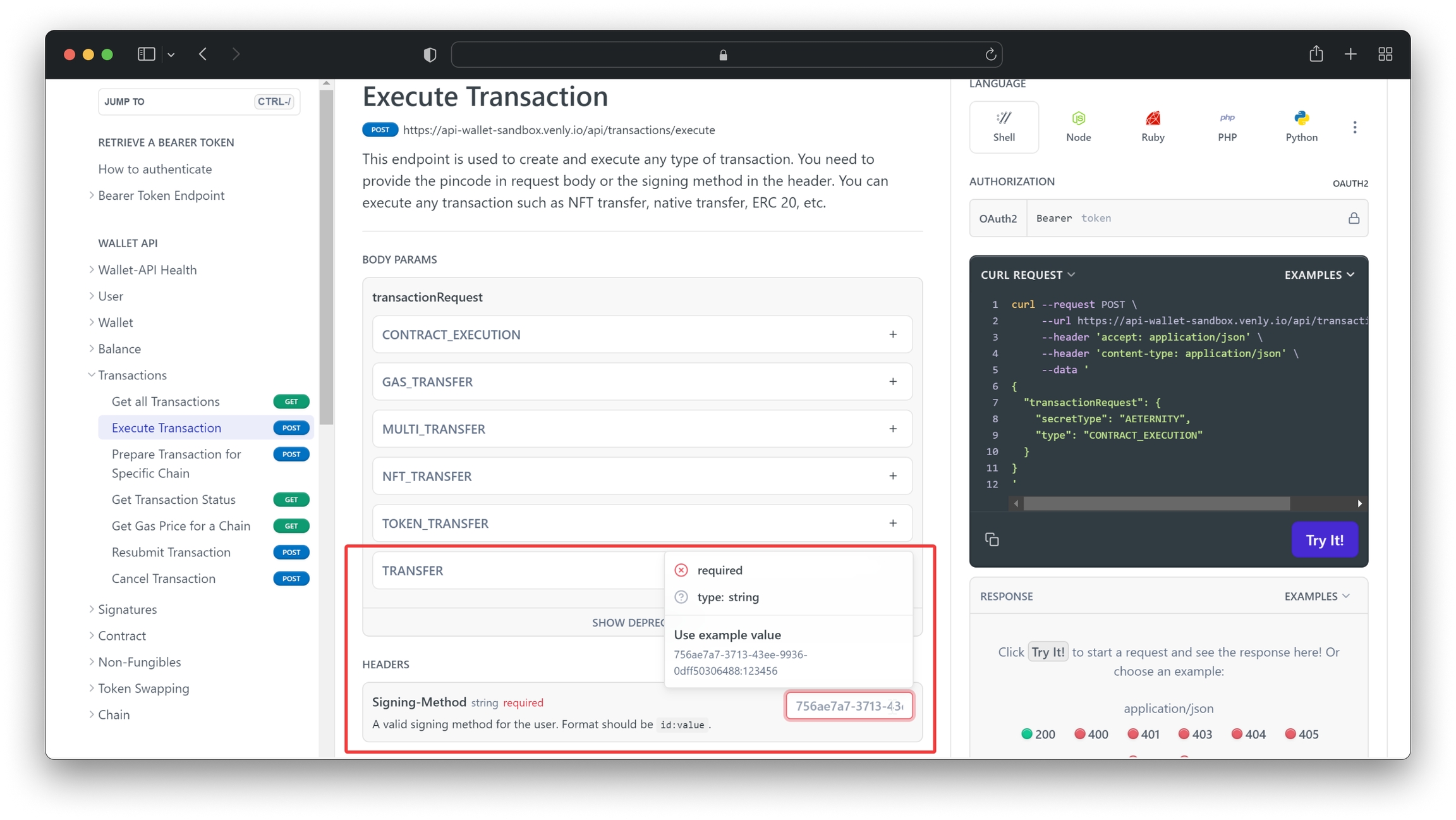
When using our API-Reference to execute calls, you can provide the Signing-Method value as shown below.
In practice
Now let's go a bit deeper in the flow and the different endpoints that are relevant to working with signing methods.
1. Create a Signing Method
A signing method is a crucial means of authentication within Quantum's platform. Initially, setting a signing method for a user is straightforward, as we can quickly provide the required data. However, authentication is necessary when adding a signing method. This means that a new signing method cannot be added without first providing an existing one for that user (except when creating a PIN signing method for the first time).
This process mirrors the familiar concept of changing a password, wherein setting a new password typically requires providing the old one for verification. It's worth noting that while adding a new signing method, the initial one remains intact.
In this example, we will create an emergency code signing method.
Call the following endpoint to create a signing method:
Request Endpoint: reference
HTTP
Path Parameters:
{userId}
Path
This is the User ID whose signing method you want to create.
String
✅
Header Parameters:
For this example, the user already has an existing PIN signing method, that's why we are providing the PIN signing method in the header request to authenticate the call.
Signing-Method
id:value
id: This is the ID of the signing methodvalue: This is the value of the signing method
Request Body:
type
string
This parameter indicates the type of signing method. (e.g., PIN, EMERGENCY_CODE, BIOMETRIC.)
value
string
This is the value of your signing method. For example, the value for EMERGENCY_CODE can be “w2v7yertaad21lhudqghzwcg4”. To autogenerate the emergency code, this can be removed.
📘For this example, we will create the emergency code signing method.
The body does not contain the value property because we want to autogenerate the emergency code.
JSON
Response Body:
Description of parameters under the result object:
result.
id: This is the signing method IDresult.
value: This is the value of the generated emergency code
JSON
2. Recover a Signing Method
The secondary goal of the signing methods is for users to have different means of recovering access to their wallets. In case a signing method’s value is lost, it can be updated by using another valid signing method.
In this example, a user has forgotten their PIN, and we will reset the PIN signing method for this user by using a second signing method (Emergency Code or Biometric).
To authorize the request, the second signing method will be passed in the header together with the bearer token.
The endpoint has two path parameters, and the request body will contain the new PIN, indicated by the value parameter.
Request Endpoint: reference
HTTP
Path Parameters:
{userId}
Path
This is the User ID whose signing method you want to create.
String
✅
{signingMethodId}
Path
This is the ID of the user's PIN signing method
String
✅
Header Parameters:
Provide the User's Signing-Method in the header request to authenticate the call. In this case, we are resetting the PIN, so you need to provide either the emergency code or biometric signing method here.
Signing-Method
id:value
id: This is the ID of the signing methodvalue: This is the value of the signing method
Request Body:
value: This will be your new PIN code
JSON
Response Body:
JSON
📘For more information on how to use Signing methods, please have a look at the following guides.
👍So we covered the concepts of Signing Methods. To understand better how to are related to the user concept we recommend reading User Management. If you feel you have grasped the concepts that a good place to start is the Getting started guide or any of the Basic Guides.
Last updated